HDTV Scroll
|
Joined: Oct 2004
Posts: 21
hobbyist
|
OP

hobbyist
Joined: Oct 2004
Posts: 21 |
I've been a proud and happy Axiom owner for several years but I have one "issue" that I need your help with. Why can't I view the scroll along the bottom of the screen while I'm watching a HD channel.When I'm watching a football game I cant see the others scores that scroll by on the bottom of the screen.It's down there but the picture dimensions aren't quite right or something. Anyone else have this happen?
Thanks guys, your the best!
"If you follow the herd, you step in what they leave behind"
|
|
|
Re: HDTV Scroll
|
Joined: Jan 2004
Posts: 13,840 Likes: 13
shareholder in the making
|
|
shareholder in the making
Joined: Jan 2004
Posts: 13,840 Likes: 13 |
My guess is you have your aspect ratio on your tv set to something other than 16:9. My dad has a Hitachi plasma 16:9 television above his fireplace mantel. Many of the channels on cable are not in 16:9 format, but standard 4:3. So he gets black bars on the sides, he does not like that...So he uses some weird setting called 4:3 zoom or something like that which gives him the same thing you describe along the bottom of the screen. If he cycles through the various aspect ratios on the remote control and selects 16:9 standard it looks fine.
M80s VP180 4xM22ow 4xM3ic EP600 2xEP350
AnthemAVM60 Outlaw7700 EmoA500 Epson5040UB FluanceRT85
|
|
|
Re: HDTV Scroll
|
Joined: Sep 2004
Posts: 5,422
axiomite
|
|
axiomite
Joined: Sep 2004
Posts: 5,422 |
I agree. It sounds like a setting on the TV that is zooming in on a 4:3 ratio image to fill the width of the 16:9 screen. Instead of just stretching the width (and making everyone look "fat") it is magnifying the image and the top and bottom actually end up outside of the screen area like you are describing.
Farewell - June 4, 2020
|
|
|
Re: HDTV Scroll
|
Joined: Feb 2005
Posts: 86
old hand
|
|
old hand
Joined: Feb 2005
Posts: 86 |
Try a stretch setting instead of a zoom setting. It makes everyone look a little fat but at least you can see everything.
Professional Axiom Lurker
|
|
|
Re: HDTV Scroll
|
Joined: Dec 2003
Posts: 6,331
axiomite
|
|
axiomite
Joined: Dec 2003
Posts: 6,331 |
What make and model TV do you have? There is another thing called "overscan." Most all sets cut off a small percentage of the picture on all 4 sides to avoid video "noise" which can be present along the edges of the picture. Between 2 and 4% overscan is considered normal. If you have DVE or Avia, they have patterns that show how much overscan your TV has.
But, sometimes the overscan is excessive and cuts of important information. This can particularly be noticed if stations have a crawl or logo positioned very close to the bottom or side of the picture. If you're not using a zoomed setting on your TV, then it's possible your TV has excessive overscan. I believe this can be corrected to some degree by a technician or ISF calibrator who can access the service menu of your TV. Accessing the service menu should only be done by someone who knows what they are doing. Real damage can be done in the service menu.
Jack
"People generally quarrel because they cannot argue." - G. K. Chesterton
|
|
|
Re: HDTV Scroll
|
Joined: May 2003
Posts: 2,185
connoisseur
|
|
connoisseur
Joined: May 2003
Posts: 2,185 |
Could also be due to overscan. I suggest calibrating your display with a DVD like Avia or DVE. You can find them on Amazon. You need to calibrate for each input on your diplay: composite, component, svid, DVI and/or HDMI. Granted you need an HDMI/DVI DVD player to handle those. After calibrating w/ the DVD, you can run this method called "steaming rat", which IMHO, gets you even better results than the DVD alone. Steaming Rat
|
|
|
Re: HDTV Scroll
|
Joined: May 2003
Posts: 18,044
shareholder in the making
|
|
shareholder in the making
Joined: May 2003
Posts: 18,044 |
Or you could just (gasp) live with the black bars and view things at the intended aspect ratio.
I am the Doctor, and THIS... is my SPOON!
|
|
|
Re: HDTV Scroll
|
Joined: Dec 2003
Posts: 3,602
connoisseur
|
|
connoisseur
Joined: Dec 2003
Posts: 3,602 |
Quote:
Try a stretch setting instead of a zoom setting. It makes everyone look a little fat but at least you can see everything.
You may never know how much I loathe people that do that. Like Mad Max in reverse.
Bren R.
|
|
|
Re: HDTV Scroll
|
Joined: Apr 2003
Posts: 16,441
shareholder in the making
|
|
shareholder in the making
Joined: Apr 2003
Posts: 16,441 |
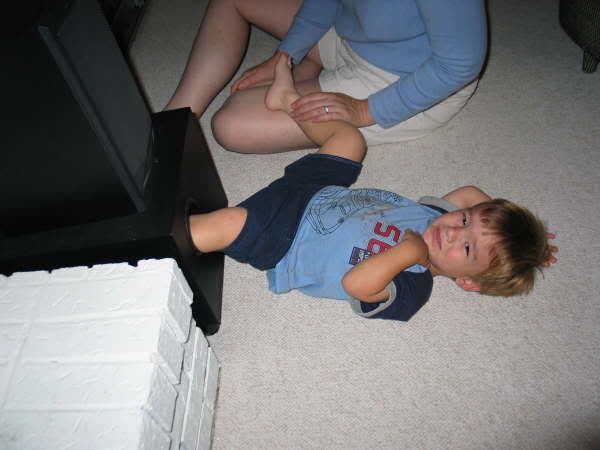
Ummm. How did that kid get his leg in the subwoofer???
|
|
|
|
Forums16
Topics24,945
Posts442,486
Members15,617
| |
Most Online2,082
Jan 22nd, 2020
|
|
|
0 members (),
586
guests, and
6
robots. |
|
Key:
Admin,
Global Mod,
Mod
|
|
|
|