A Little Help, Please.
|
Joined: Dec 2003
Posts: 6,331
axiomite
|
OP

axiomite
Joined: Dec 2003
Posts: 6,331 |
OK, I'm starting my monumental project of converting audio tapes (reel-to-reel and cassette) to digital. These are studio and live tapes of the many groups I've performed in along with tapes of some of my Radio DJ days. I've got the tape decks connected to my computer. I'm using Audacity to record the tapes to digital on the computer. But, what format do I save them in so I can burn them to CDs which will be playable in home DVD and CD players? Here are the choices offered by Audacity. 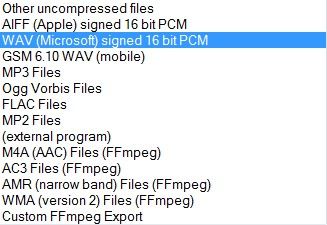
Jack
"People generally quarrel because they cannot argue." - G. K. Chesterton
|
|
|
Re: A Little Help, Please.
|
Joined: Feb 2009
Posts: 3,466
connoisseur
|
|
connoisseur
Joined: Feb 2009
Posts: 3,466 |
The one you have selected is right. Also make sure they are 44.1 kHz.
Pioneer PDP-5020FD, Marantz SR6011
Axiom M5HP, VP160HP, QS8
Sony PS4, surround backs
-Chris
|
|
|
Re: A Little Help, Please.
|
Joined: Dec 2003
Posts: 6,331
axiomite
|
|
OP
axiomite
Joined: Dec 2003
Posts: 6,331 |
There's a little window in the bottom left corner of Audacity which looks like this. 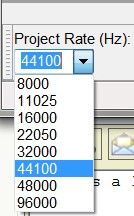 I hope the 44100 setting is what you are talking about. Can you tell I'm a novice 
Jack
"People generally quarrel because they cannot argue." - G. K. Chesterton
|
|
|
Re: A Little Help, Please.
|
Joined: Feb 2009
Posts: 3,466
connoisseur
|
|
connoisseur
Joined: Feb 2009
Posts: 3,466 |
Pioneer PDP-5020FD, Marantz SR6011
Axiom M5HP, VP160HP, QS8
Sony PS4, surround backs
-Chris
|
|
|
Re: A Little Help, Please.
|
Joined: Sep 2004
Posts: 11,458
shareholder in the making
|
|
shareholder in the making
Joined: Sep 2004
Posts: 11,458 |
Yes, Jack. A 16 bit .WAV file samples at 44.1KHz (44,100) is correct.
Make sure that you do, indeed, burn them as audio CDs (don't just burn the file to CD as a data disc).
::::::: No disrespect to Axiom, but my favorite woofer is my yellow lab :::::::
|
|
|
Re: A Little Help, Please.
|
Joined: Oct 2006
Posts: 484
devotee
|
|
devotee
Joined: Oct 2006
Posts: 484 |
This sounds like a fun project. I recently did the same with some long lost cassette tapes. When you're ready to create your CDs, I can't recommend a free and easy to use little program called CDBurnerXP strongly enough. It's just a great utility.
|
|
|
Re: A Little Help, Please.
|
Joined: Dec 2003
Posts: 6,331
axiomite
|
|
OP
axiomite
Joined: Dec 2003
Posts: 6,331 |
Thanks everybody. Mark, in addition to CD-R or CD-RW, can I burn to DVD-R and/or DVD+RW?
Kruncher, I'll check into that program. Thanks.
Jack
"People generally quarrel because they cannot argue." - G. K. Chesterton
|
|
|
Re: A Little Help, Please.
|
Joined: Sep 2004
Posts: 11,458
shareholder in the making
|
|
shareholder in the making
Joined: Sep 2004
Posts: 11,458 |
Jack, you should use CD-R discs only. If you're going to be giving any out, you want to make sure that the discs you create will play on a standard CD player. Again, make sure that the discs are burned as Audio CDs...not data...so they are finalized correctly. If you put all these files on a drive and sent it to me, I could output Redbook CDs and duplicate and print copies for you to distribute! 
::::::: No disrespect to Axiom, but my favorite woofer is my yellow lab :::::::
|
|
|
Re: A Little Help, Please.
|
Joined: Dec 2003
Posts: 6,331
axiomite
|
|
OP
axiomite
Joined: Dec 2003
Posts: 6,331 |
Well, I've only just begun to record to digital. I really wasn't planning on "giving any out." I can't imagine anyone would want such ancient, primitive music. However, when it comes time for burning, you'll be hearing from me. 
Jack
"People generally quarrel because they cannot argue." - G. K. Chesterton
|
|
|
Re: A Little Help, Please.
|
Joined: Dec 2007
Posts: 7,786
axiomite
|
|
axiomite
Joined: Dec 2007
Posts: 7,786 |
If you put all these files on a drive and sent it to me, I could output Redbook CDs and duplicate and print copies for you to distribute! Just don't let him put Boobies all over those CDs. Hmm, on second thought...
Fred
-------
Blujays1: Spending Fred's money one bottle at a time, no two... Oh crap!
|
|
|
|
Forums16
Topics24,945
Posts442,480
Members15,617
| |
Most Online2,082
Jan 22nd, 2020
|
|
|
0 members (),
1,048
guests, and
2
robots. |
|
Key:
Admin,
Global Mod,
Mod
|
|
|
|