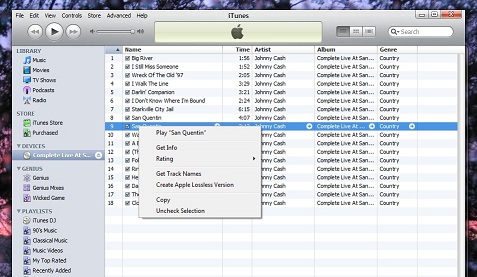
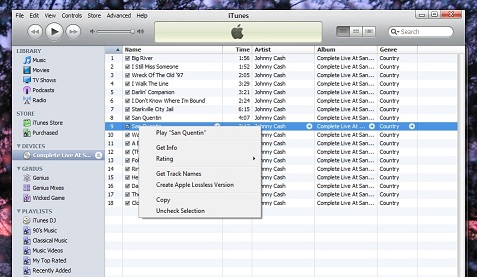
Q. Recently I noticed that if you right-click on songs youve downloaded from iTunes, you can "Create Apple Lossless Version." My husband and I did an experiment this morning and it took a song from 8MB to 25MB. The whole thing happened quite quickly, almost as though it "unzipped" something. Do you know how this works?—A.C.
(I don't use iTunes so I posed the question to Andrew Welker, Axiom Audio Engineer, and to Chris--Club Neon on the Axiom forums. A.L.)
A. Andrew Welker replies: "Just as there is no such thing as a free lunch, you can't create something out of nothing. If you try this operation on a file that is in a naturally uncompressed format, like the WAV file that comes right off a CD, you will end up with an Apple lossless copy that will be indistinguishable from the original. No data or information is actually thrown away; it has simply been rearranged into a smaller package.
What you have done has created a lossless copy of a compressed MP3 or AAC file. The lossless converter has no idea that you are starting with a compressed file, so it tries to work its rearranging magic as if the file was directly from a CD. If it actually had been a big uncompressed file you would find a big reduction in space after conversion to lossless. This does not apply with your compressed MP3/AAC file because of the way the conversion algorithm tires to rearrange the data."
Club Neon replies: "I'm not an iTunes user, but I think I know what the option is for. Its main intent is to convert a PCM file (WAV, AIFF) into Lossless AAC. But the way iTunes file associations work, any audio file will get the same conversion options. When an MP3 is played, the lossy compression has to be undone and converted to PCM (Pulse Code Modulation) before it is sent to the sound card. The process can be short circuited, and the resulting PCM information recompressed into another format, but it gains nothing. In fact if an MP3 is converted to lossy AAC, there's a double loss incurred.
One use for converting lossy files to lossless is for double-blind studies into lossy compression artifacts. An audio sample is converted to MP3 or whatever, and then that file is decoded into a WAV, and distributed to the listeners. That way they have no idea of the compression algorithm employed based on the file information."
Given the above, it's rather misleading of the prompt in the Apple menu to suggest that you can "create an Apple lossless version" of any music file. Most users would not realize that lossy music files cannot be "improved" by this process.
What's your experience with Apple Lossless?